
How to Write an Instagram Bio: Character Limits, Tips, and Examples
What Is an Instagram Bio?
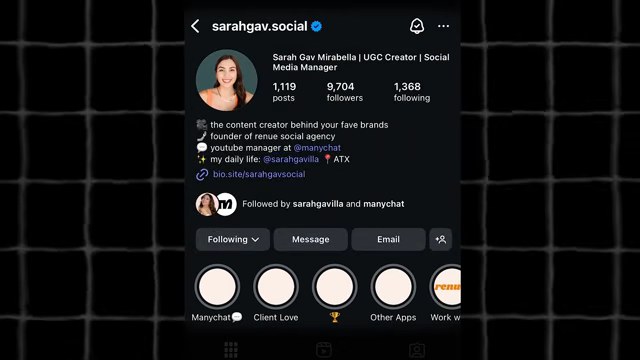
An Instagram bio is the short block of text below a username that introduces a profile to new visitors. It supports up to 150 characters and typically states who the account belongs to, what it offers, and why a visitor might want to follow it.
The bio sits at the top of the profile, alongside the profile photo, name field, and any links. For most visitors, it is the first piece of writing they read before deciding whether to follow, tap a link, or scroll past. Instagram also indexes the words in the bio and name fields for its internal search, so the text does more than introduce an account; it affects whether the account turns up when someone searches a topic or niche.
How Many Characters Can an Instagram Bio Have?
An Instagram bio holds 150 characters, counting letters, numbers, spaces, punctuation, and emoji.
Emoji typically count as two or more characters each, since Instagram encodes them using multiple code units, so a bio built heavily around emoji fills up faster than one built from plain text. Other profile fields carry their own separate limits.
| Field | Character Limit | Notes |
|---|---|---|
| Bio | 150 | Includes spaces, punctuation, and emoji |
| Username (@handle) | 30 | Letters, numbers, periods, and underscores only |
| Name field | 30 | Allows spaces and emoji; searchable |
| Caption | 2,200 | Only the first 125 characters show before “more” |
| Direct message | 1,000 | Per message |
The name field, shown in bold above the bio, is easy to overlook but carries its own weight. Unlike the username, it accepts spaces and emoji, and Instagram indexes it for search alongside the bio. A name field that reads “Maria Chen, Wedding Photographer” is more discoverable in Instagram search than a name field that repeats the username.
What Should an Instagram Bio Include?
An Instagram bio works best with four elements: a clear identity, a specific detail, searchable keywords, and a call to action.
- A one-line identity that states who the account belongs to and what it does, without relying on job titles alone.
- One specific, credible detail, such as a niche, a credential, or a number, rather than a generic description that could describe any account in the same category.
- Keywords related to the account’s niche or profession, since Instagram’s search indexes bio text the way a search engine indexes a web page.
- A single call to action pointing toward a link, a DM, or another next step, instead of several competing options.
How Do You Write an Instagram Bio?
Writing an effective Instagram bio follows six steps, from defining an identity to adding a link.
- Write a one-line identity: state who the account belongs to and what it does, in plain language.
- Add one specific detail instead of a generic description; a number, a location, or a niche performs better than a vague phrase.
- Include a keyword or two that describes the niche, since Instagram’s search algorithm indexes bio and name text.
- Add a single call to action, such as “Shop the link below” or “DM for collabs,” instead of listing several options.
- Use emoji as visual separators between lines or ideas, rather than replacing entire words with them.
- Draft the bio in a notes app first, since line breaks typed directly into Instagram’s bio editor do not always save correctly on every device, then paste the finished text into the bio field.
How Do You Add a Link to an Instagram Bio?
Instagram allows up to five external links in a bio, though only one link displays directly; the rest appear in a pop-up menu when a visitor taps it.
- Open the Instagram app and go to the profile tab.
- Tap Edit Profile.
- Under the Links section, tap Add External Link.
- Enter the URL and a short title for each link.
- Repeat for up to five links, then tap Done to save.
Accounts that want every link visible at once, rather than behind a tap, often use a third-party link-in-bio tool instead of Instagram’s built-in links.
What Are Common Instagram Bio Mistakes?
The most common Instagram bio mistakes are vagueness and inaction: generic phrasing, no call to action, and a bio that never gets updated.
- Generic phrases such as “just living my best life,” which say nothing specific about the account.
- No call to action, leaving visitors unsure what to do next.
- Ignoring keywords, which lowers the chance of appearing in Instagram search results.
- Cramming every offer, hashtag, and credential into 150 characters instead of picking one focus.
- Leaving the bio unchanged for years after the account’s niche or offer has changed.
How Does an Instagram Bio Differ by Account Type?
Bio strategy shifts by account type: personal and creator bios lean on specificity and personality, while business bios lean on outcomes and credibility.
Personal and creator accounts perform better with a precise niche statement than with a personality-only description. A line such as “I help first-time home buyers find houses in Austin” outperforms a vague line such as “dreamer, coffee lover, dog mom,” because it tells a visitor exactly what to expect from the content. Business accounts, by contrast, tend to lead with results: a revenue figure, a customer count, or a specific service, followed by one call to action such as “Book a consult” or “Shop the drop.” In both cases, the bio works best when it matches what the account actually posts; a mismatch between the bio’s promise and the content that follows is a common reason visitors leave without following.
What Are Some Instagram Bio Examples?
Bio structure changes by account type, but each example below fits the 150-character limit while including an identity, a detail, and a call to action.
- Personal: Photographer based in Lisbon 📷 Sharing street photos and film tips DM for prints
- Creator: Content strategist helping small brands grow on Instagram 📈 New tips every Tuesday
- Business: Family-run bakery in Austin 🥐 Fresh sourdough daily Order below
Is an Instagram Bio Worth Optimizing?
An Instagram bio is worth optimizing because it functions as both a first impression and a search listing, influencing whether a visitor follows an account and whether the account appears in Instagram search at all.
A 150-character field forces a direct answer to three questions: who runs the account, what it offers, and why it is worth following. Accounts that answer those questions clearly, and revisit the bio as their content or offer changes, get more consistent value from that small block of text than accounts that write it once and leave it alone.
Common Questions About Instagram Bios
Can Line Breaks Be Used in an Instagram Bio?
Yes. Line breaks make a bio easier to scan, though they sometimes fail to save when typed directly into Instagram’s bio editor. Writing the bio in a notes app first and pasting it in avoids this problem.
Does an Instagram Bio Affect Instagram Search Results?
Yes. Instagram indexes the text in the bio and name fields, so relevant keywords in either field can affect whether an account appears in search results for a topic or niche.
Can a Personal Account Use the Same Bio Strategy as a Business?
Not exactly. A personal or creator account benefits more from a specific niche statement, while a business account tends to perform better leading with a concrete outcome or credential before the call to action.
How Often Does an Instagram Bio Need Updating?
No fixed schedule applies, but a bio that no longer matches an account’s current content or offer works against it. Revisiting it each quarter, or whenever the offer changes, keeps it accurate.
Sources
- Replug: Instagram Character Limit Explained for 2026
- Sendcove: Instagram Character Limits Guide
- Flock Social: Instagram Character Limit Guide
- Planoly: Instagram Now Allows Multiple Links in Your Bio
- Captions: Instagram Bio Ideas for Brands and Businesses
- Virlo: Instagram Bio Ideas 2026 Guide With Real Examples
